2025
NEUCA Design System 2.0
NEUCA Design System 2.0 – a scalable, responsive, and WCAG-compliant design framework built in Figma. Streamlines SaaS, e-commerce, and healthcare platforms with Atomic Design, variables, and reusable components.
Design System
Product design
Know More
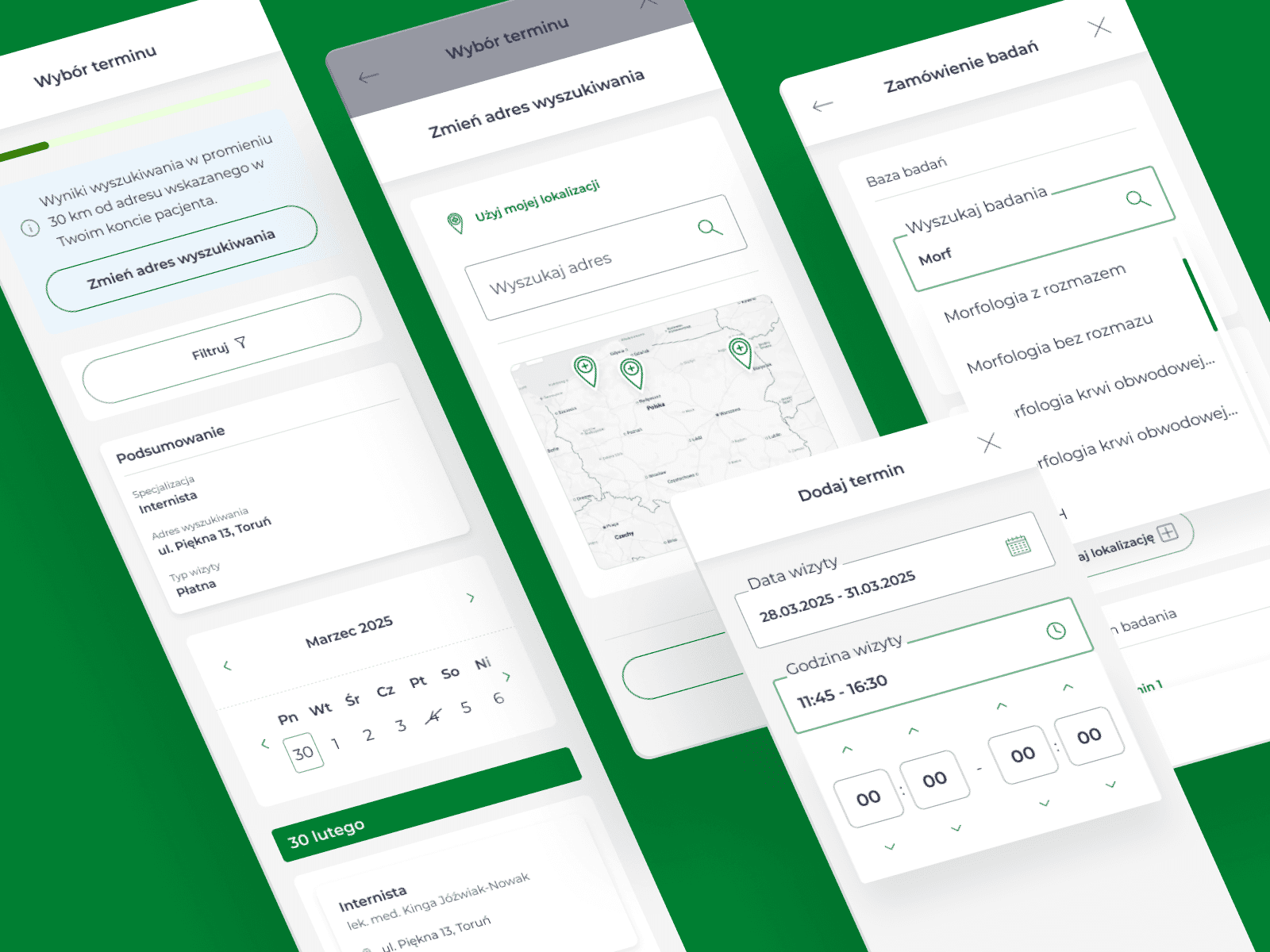
NEUCA Design System 2.0 unifies the company’s digital ecosystem from e-commerce to patient portals.
From Fragmentation to Consistency: Rebuilding the NEUCA Design System
The NEUCA Design System 2.0 is a scalable and fully responsive design framework built in Figma, created to unify digital products across healthcare, e-commerce, and SaaS platforms. Based on Atomic Design methodology and powered by Figma variables and tokens, the system supports breakpoints for desktop, tablet, and mobile, enabling seamless prototyping and faster time-to-market. By reducing component variants by over 60% and embedding WCAG 2.2 accessibility standards at the token level, the Design System ensures consistency, compliance, and performance across complex, data-heavy applications such as patient portals, pharmacy e-commerce platforms, and medical SaaS tools. This approach not only decreases design debt and development costs but also guarantees a user-centered experience that is flexible, scalable, and ready for future theming, brand updates, and accessibility requirements.


Problem
The earlier Design System was disjointed, missing variables, and overloaded with component variations. Handling responsiveness and scaling manually created extra complexity, leading to slower prototyping, higher maintenance, and inconsistent results.
The previous Design System was fragmented and inconsistent, making it difficult to scale across products and teams. It lacked variables and tokens, which meant every responsive state had to be created manually. Designers were forced to maintain dozens of redundant component variants, leading to design debt and inefficiency. Responsiveness for desktop, tablet, and mobile required separate builds instead of adaptive breakpoints, creating unnecessary complexity in both design and development. As a result, prototyping was slow, maintenance costs were high, and outputs varied across projects—reducing consistency, slowing down delivery, and making collaboration between design and engineering more difficult.
Solution
Rebuilt NEUCA Design System in Figma with variables, tokens, and breakpoints—reduced component variants by 60%, enabled responsive prototypes, and ensured WCAG compliance.
I rebuilt the Design System from the ground up using Figma variables, tokens, and breakpoint modes (desktop, tablet, mobile). By applying Atomic Design principles and a modular structure, I reduced component variants by 60% while ensuring every prototype could automatically adapt to responsive layouts.
The system was divided into three object areas:
Base → core components (typography, colors, spacing, primitives, tokens, grids).
Back → data-heavy, transactional back-office tools (dashboards, patient accounts, medical workflows).
Front → marketing- and sales-focused UI (product listings, landing pages, promotional components).
All layers were unified by global spacing and gap variables, ensuring consistency across headers, body sections, and footers. WCAG guidelines were integrated at token level (typography, contrast, ARIA interactions), making accessibility scalable and auditable.
Profit
The NEUCA Design System 2.0 is a scalable, WCAG-compliant framework that streamlines prototyping, reduces design debt, and ensures consistent, responsive experiences across all platforms.
Efficiency → Faster prototyping with responsive breakpoints built-in, reducing design debt and time-to-market.
Scalability → Centralized variables and tokens enabled flexible theming (e.g., dark/light mode, brand variations) and reduced maintenance costs.
Consistency → Unified structures guaranteed predictable layouts across all NEUCA platforms (apteline.pl, swiatzdrowia.pl, moj.swiatzdrowia.pl).
Compliance → WCAG readiness ensured accessibility before audits, lowering the risk of remediation costs.
The result is a compressed, scalable, and fully responsive Design System that accelerates delivery, simplifies maintenance, and guarantees brand and accessibility standards across multiple digital products.
-60
%
Fewer components
The number of components and their variants reduced by more than half compared to the original scope. Implemented using ‘modes’ within variables in the scope of breakpoint scaling, states, and validation
40
%
Faster environment
By reducing the number of objects, the implementation of components in projects has accelerated their operation and streamlined construction thanks to supercomponents.
Launch
Here are examples of processes visualized with DS 2.0 components, designed to ensure consistency across desktop, tablet, and mobile. Built with variables and tokens, the system guarantees responsive layouts and WCAG-compliant accessibility across all products.
Patient account
Desktop
Core project showcasing processes developed using DS 2.0
Source file
FFS v 2.0
Desktop
Ideation file for designing the online visit scheduling process
FigJam
Packages
Desktop
Mobile
Clickable mobile prototype of medical packages list and details
Prototype
Visits schedule
Desktop
Mobile
Interactive prototype showcasing a responsive, step-by-step schedule flow
Prototype
FFS v 2.0
Desktop
Mobile
Clickable and responsive prototype with full registration process
Prototype
FFS v 2.0
Desktop
Mobile
Clickable prototype with full registration process
Prototype
Team & Tools
Team composition and design tools utilized for this project.
Collaborated across three project teams, managing designers and working closely with developers, supported by a well-configured toolkit.
My team
The project involved three cross-functional teams, each working in separate environments and stages: one focused on an MVP, another on ongoing maintenance, and the third on new feature development. Each team included Product Owners, Analysts, Frontend and Backend Developers, and Project Managers, supported by two UI/UX Designers and a consultant responsible for user flows and issue analysis. I managed the design team and worked closely with developers to implement layouts via Figma Dev Mode and a structured system of variables.
Tools I used
Figma – source files, prototyping, and developer handoff
Figma AI – copywriting refinements and image editing
FigJam – ideation workshops and materials gathering
Jira – backlog, epics, and issue tracking
Confluence – documentation and knowledge sharing
ChatGPT – analysis support for consistency across processes and requirements
Figma Make – component setup for dev kickoffs
2025
NEUCA Design System 2.0
NEUCA Design System 2.0 – a scalable, responsive, and WCAG-compliant design framework built in Figma. Streamlines SaaS, e-commerce, and healthcare platforms with Atomic Design, variables, and reusable components.
Design System
Product design
Know More
NEUCA Design System 2.0 unifies the company’s digital ecosystem from e-commerce to patient portals.
From Fragmentation to Consistency: Rebuilding the NEUCA Design System
The NEUCA Design System 2.0 is a scalable and fully responsive design framework built in Figma, created to unify digital products across healthcare, e-commerce, and SaaS platforms. Based on Atomic Design methodology and powered by Figma variables and tokens, the system supports breakpoints for desktop, tablet, and mobile, enabling seamless prototyping and faster time-to-market. By reducing component variants by over 60% and embedding WCAG 2.2 accessibility standards at the token level, the Design System ensures consistency, compliance, and performance across complex, data-heavy applications such as patient portals, pharmacy e-commerce platforms, and medical SaaS tools. This approach not only decreases design debt and development costs but also guarantees a user-centered experience that is flexible, scalable, and ready for future theming, brand updates, and accessibility requirements.
Problem
The earlier Design System was disjointed, missing variables, and overloaded with component variations. Handling responsiveness and scaling manually created extra complexity, leading to slower prototyping, higher maintenance, and inconsistent results.
The previous Design System was fragmented and inconsistent, making it difficult to scale across products and teams. It lacked variables and tokens, which meant every responsive state had to be created manually. Designers were forced to maintain dozens of redundant component variants, leading to design debt and inefficiency. Responsiveness for desktop, tablet, and mobile required separate builds instead of adaptive breakpoints, creating unnecessary complexity in both design and development. As a result, prototyping was slow, maintenance costs were high, and outputs varied across projects—reducing consistency, slowing down delivery, and making collaboration between design and engineering more difficult.
Solution
Rebuilt NEUCA Design System in Figma with variables, tokens, and breakpoints—reduced component variants by 60%, enabled responsive prototypes, and ensured WCAG compliance.
I rebuilt the Design System from the ground up using Figma variables, tokens, and breakpoint modes (desktop, tablet, mobile). By applying Atomic Design principles and a modular structure, I reduced component variants by 60% while ensuring every prototype could automatically adapt to responsive layouts.
The system was divided into three object areas:
Base → core components (typography, colors, spacing, primitives, tokens, grids).
Back → data-heavy, transactional back-office tools (dashboards, patient accounts, medical workflows).
Front → marketing- and sales-focused UI (product listings, landing pages, promotional components).
All layers were unified by global spacing and gap variables, ensuring consistency across headers, body sections, and footers. WCAG guidelines were integrated at token level (typography, contrast, ARIA interactions), making accessibility scalable and auditable.
Profit
The NEUCA Design System 2.0 is a scalable, WCAG-compliant framework that streamlines prototyping, reduces design debt, and ensures consistent, responsive experiences across all platforms.
Efficiency → Faster prototyping with responsive breakpoints built-in, reducing design debt and time-to-market.
Scalability → Centralized variables and tokens enabled flexible theming (e.g., dark/light mode, brand variations) and reduced maintenance costs.
Consistency → Unified structures guaranteed predictable layouts across all NEUCA platforms (apteline.pl, swiatzdrowia.pl, moj.swiatzdrowia.pl).
Compliance → WCAG readiness ensured accessibility before audits, lowering the risk of remediation costs.
The result is a compressed, scalable, and fully responsive Design System that accelerates delivery, simplifies maintenance, and guarantees brand and accessibility standards across multiple digital products.
-60
%
Fewer components
The number of components and their variants reduced by more than half compared to the original scope. Implemented using ‘modes’ within variables in the scope of breakpoint scaling, states, and validation
40
%
Faster environment
By reducing the number of objects, the implementation of components in projects has accelerated their operation and streamlined construction thanks to supercomponents.
Launch
Here are examples of processes visualized with DS 2.0 components, designed to ensure consistency across desktop, tablet, and mobile. Built with variables and tokens, the system guarantees responsive layouts and WCAG-compliant accessibility across all products.
Patient account
Desktop
Core project showcasing processes developed using DS 2.0
Source file
FFS v 2.0
Desktop
Ideation file for designing the online visit scheduling process
FigJam
Packages
Desktop
Mobile
Clickable mobile prototype of medical packages list and details
Prototype
Visits schedule
Desktop
Mobile
Interactive prototype showcasing a responsive, step-by-step schedule flow
Prototype
FFS v 2.0
Desktop
Mobile
Clickable and responsive prototype with full registration process
Prototype
FFS v 2.0
Desktop
Mobile
Clickable prototype with full registration process
Prototype
Team & Tools
Team composition and design tools utilized for this project.
Collaborated across three project teams, managing designers and working closely with developers, supported by a well-configured toolkit.
My team
The project involved three cross-functional teams, each working in separate environments and stages: one focused on an MVP, another on ongoing maintenance, and the third on new feature development. Each team included Product Owners, Analysts, Frontend and Backend Developers, and Project Managers, supported by two UI/UX Designers and a consultant responsible for user flows and issue analysis. I managed the design team and worked closely with developers to implement layouts via Figma Dev Mode and a structured system of variables.
Tools I used
Figma – source files, prototyping, and developer handoff
Figma AI – copywriting refinements and image editing
FigJam – ideation workshops and materials gathering
Jira – backlog, epics, and issue tracking
Confluence – documentation and knowledge sharing
ChatGPT – analysis support for consistency across processes and requirements
Figma Make – component setup for dev kickoffs
2025
NEUCA Design System 2.0
NEUCA Design System 2.0 – a scalable, responsive, and WCAG-compliant design framework built in Figma. Streamlines SaaS, e-commerce, and healthcare platforms with Atomic Design, variables, and reusable components.
Design System
Product design
Know More
NEUCA Design System 2.0 unifies the company’s digital ecosystem from e-commerce to patient portals.
From Fragmentation to Consistency: Rebuilding the NEUCA Design System
The NEUCA Design System 2.0 is a scalable and fully responsive design framework built in Figma, created to unify digital products across healthcare, e-commerce, and SaaS platforms. Based on Atomic Design methodology and powered by Figma variables and tokens, the system supports breakpoints for desktop, tablet, and mobile, enabling seamless prototyping and faster time-to-market. By reducing component variants by over 60% and embedding WCAG 2.2 accessibility standards at the token level, the Design System ensures consistency, compliance, and performance across complex, data-heavy applications such as patient portals, pharmacy e-commerce platforms, and medical SaaS tools. This approach not only decreases design debt and development costs but also guarantees a user-centered experience that is flexible, scalable, and ready for future theming, brand updates, and accessibility requirements.
Problem
The earlier Design System was disjointed, missing variables, and overloaded with component variations. Handling responsiveness and scaling manually created extra complexity, leading to slower prototyping, higher maintenance, and inconsistent results.
The previous Design System was fragmented and inconsistent, making it difficult to scale across products and teams. It lacked variables and tokens, which meant every responsive state had to be created manually. Designers were forced to maintain dozens of redundant component variants, leading to design debt and inefficiency. Responsiveness for desktop, tablet, and mobile required separate builds instead of adaptive breakpoints, creating unnecessary complexity in both design and development. As a result, prototyping was slow, maintenance costs were high, and outputs varied across projects—reducing consistency, slowing down delivery, and making collaboration between design and engineering more difficult.
Solution
Rebuilt NEUCA Design System in Figma with variables, tokens, and breakpoints—reduced component variants by 60%, enabled responsive prototypes, and ensured WCAG compliance.
I rebuilt the Design System from the ground up using Figma variables, tokens, and breakpoint modes (desktop, tablet, mobile). By applying Atomic Design principles and a modular structure, I reduced component variants by 60% while ensuring every prototype could automatically adapt to responsive layouts.
The system was divided into three object areas:
Base → core components (typography, colors, spacing, primitives, tokens, grids).
Back → data-heavy, transactional back-office tools (dashboards, patient accounts, medical workflows).
Front → marketing- and sales-focused UI (product listings, landing pages, promotional components).
All layers were unified by global spacing and gap variables, ensuring consistency across headers, body sections, and footers. WCAG guidelines were integrated at token level (typography, contrast, ARIA interactions), making accessibility scalable and auditable.
Profit
The NEUCA Design System 2.0 is a scalable, WCAG-compliant framework that streamlines prototyping, reduces design debt, and ensures consistent, responsive experiences across all platforms.
Efficiency → Faster prototyping with responsive breakpoints built-in, reducing design debt and time-to-market.
Scalability → Centralized variables and tokens enabled flexible theming (e.g., dark/light mode, brand variations) and reduced maintenance costs.
Consistency → Unified structures guaranteed predictable layouts across all NEUCA platforms (apteline.pl, swiatzdrowia.pl, moj.swiatzdrowia.pl).
Compliance → WCAG readiness ensured accessibility before audits, lowering the risk of remediation costs.
The result is a compressed, scalable, and fully responsive Design System that accelerates delivery, simplifies maintenance, and guarantees brand and accessibility standards across multiple digital products.
-60
%
Fewer components
The number of components and their variants reduced by more than half compared to the original scope. Implemented using ‘modes’ within variables in the scope of breakpoint scaling, states, and validation
40
%
Faster environment
By reducing the number of objects, the implementation of components in projects has accelerated their operation and streamlined construction thanks to supercomponents.
Launch
Here are examples of processes visualized with DS 2.0 components, designed to ensure consistency across desktop, tablet, and mobile. Built with variables and tokens, the system guarantees responsive layouts and WCAG-compliant accessibility across all products.
Patient account
Desktop
Core project showcasing processes developed using DS 2.0
Source file
FFS v 2.0
Desktop
Ideation file for designing the online visit scheduling process
FigJam
Packages
Desktop
Mobile
Clickable mobile prototype of medical packages list and details
Prototype
Visits schedule
Desktop
Mobile
Interactive prototype showcasing a responsive, step-by-step schedule flow
Prototype
FFS v 2.0
Desktop
Mobile
Clickable and responsive prototype with full registration process
Prototype
FFS v 2.0
Desktop
Mobile
Clickable prototype with full registration process
Prototype
Team & Tools
Team composition and design tools utilized for this project.
Collaborated across three project teams, managing designers and working closely with developers, supported by a well-configured toolkit.
My team
The project involved three cross-functional teams, each working in separate environments and stages: one focused on an MVP, another on ongoing maintenance, and the third on new feature development. Each team included Product Owners, Analysts, Frontend and Backend Developers, and Project Managers, supported by two UI/UX Designers and a consultant responsible for user flows and issue analysis. I managed the design team and worked closely with developers to implement layouts via Figma Dev Mode and a structured system of variables.
Tools I used
Figma – source files, prototyping, and developer handoff
Figma AI – copywriting refinements and image editing
FigJam – ideation workshops and materials gathering
Jira – backlog, epics, and issue tracking
Confluence – documentation and knowledge sharing
ChatGPT – analysis support for consistency across processes and requirements
Figma Make – component setup for dev kickoffs